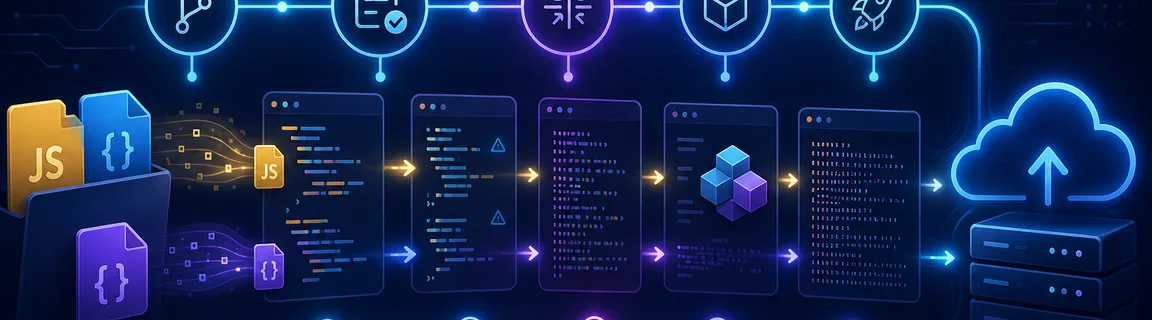
Automate Minification in CI/CD (GitHub Actions, GitLab CI)
Learn how to integrate JavaScript and CSS minification into your CI/CD pipelines. Concrete examples with GitHub Actions and GitLab CI for optimized deployments.
Why automate minification in CI/CD?
Manually minifying files before every release works... until someone forgets. Moving minification into the pipeline gives you consistent, verifiable, reproducible output on every deployment. To validate a snippet before industrializing the setup, you can still use our online JavaScript minifier or our online CSS minifier.
Best practices for production-grade minification
This is a healthy baseline for most modern front-end projects.
Many teams add a minification step without clarifying whether it duplicates what Webpack, Vite, or Next.js already does. Always start by understanding your stack. For the fundamentals, revisit our JavaScript minification guide and CSS minification guide.
Prepare the build foundation first
Before wiring GitHub Actions or GitLab CI, make your local commands reliable. The pipeline should simply run the same scripts you trust locally so behavior stays aligned across environments.
On a simple project, you can minify assets with CLI tools before or after the main build. The goal is not to overcomplicate your stack, but to keep commands explicit, testable, and reusable inside CI.
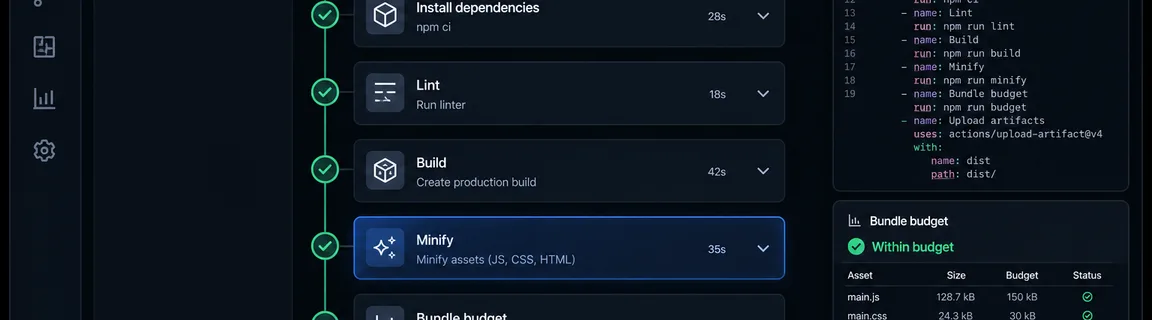
What the pipeline should actually validate
Automating minification is not just about running one command. A strong pipeline also verifies consistency, resulting asset size, and overall build quality.
Minimal build
Robust pipeline
Add a few simple but high-value safeguards so CI becomes more than a black-box build runner.
When an online tool is still useful despite CI
Automation does not replace browser tools. Both approaches complement each other. An online tool is still practical for testing a snippet, verifying output, or exploring behavior differences before changing your pipeline.
For quick checks, use our JavaScript minifier and CSS minifier. If you need a broader framework for deciding between browser tools and build automation, also read online minifiers vs build tools.
When CI/CD should be non-negotiable
As soon as a project has multiple contributors, multiple environments, or frequent releases, minification should stop being a manual step.
Automatic minification is useful, but detecting a size regression is even more valuable. A simple Node script that reads `dist/` and fails above a threshold can prevent gradual drift.
Common tools and building blocks
Depending on your stack, you can mix several tools to cover JavaScript, CSS, and HTML.
Terser
The de facto standard for JavaScript minification, whether embedded in a bundler or used directly via CLI.
Pros:
Cons:
CSSO
A reliable way to compress stylesheets and automate CSS output in CI.
Pros:
Cons:
html-minifier-terser
Useful for static sites or builds that emit HTML suitable for post-processing.
Pros:
Cons:
Automate minification inside the pipeline
GitHub Actions is a great fit for running production builds on every push and pull request. The important part is clean dependency installation, production build execution, and a failing workflow when bundle budgets are exceeded.
Basic example
File minification
With GitLab CI, the principle is the same: start from a clean Node image, cache dependencies, and run a reproducible production build. You can then publish artifacts or hand them to a deployment stage.
Configuration
Usage
If you use Vite, Next.js, or Webpack, a lot of minification is already handled in production mode. In that case, CI mainly standardizes execution, validates budgets, and gives you traceability. For a deeper breakdown of browser tools versus build pipelines, read our article on online minifiers vs build tools.
Conclusion
Automating minification in CI/CD turns a good intention into a real guarantee. Once local scripts are stable, GitHub Actions or GitLab CI can run minification, enforce bundle budgets, and produce reliable artifacts on every release. Keep online tools for fast exploration, and treat CI as the source of truth for production.
Need to test a file quickly before adding it to the pipeline?
Related Articles
Format a Copy as cURL, parse a raw HTTP request or response and read a HAR export in your browser: nothing is sent, nothing is replayed.

Decode a JWT header and payload, or sign a test token, right in your browser: HS256, RS256, ES256, with no secret sent to a third-party server.

Length, entropy, symbols: generate a strong password in your browser with Web Crypto, no network transit, and know what the tool does not guarantee.