
Critical CSS: Extract, Minify and Inline for LCP
Extract above-the-fold CSS, minify the block, inline it in the head, then load the rest async. How it helps LCP without shipping all styles first.
Why CSS blocks your LCP
Every external stylesheet is render-blocking: the browser delays painting until it has downloaded and parsed the entire CSS file — even when only a handful of rules apply to above-the-fold content. On a marketing landing page with 180 KB of styles, Largest Contentful Paint (LCP) can easily exceed 3 seconds on mobile. The Critical CSS strategy extracts above-the-fold styles, minifies them, inlines them in the `<head>`, then loads the rest asynchronously. To shrink the extracted block immediately, FastMinify's online CSS minifier lets you validate savings in a few clicks. This guide covers the full workflow — extraction, minification, HTML inlining and measurement — as a complement to our complete CSS minification guide and the article on Core Web Vitals and minification.
Measurable impact on LCP
Realistic numbers for a page with Bootstrap + custom theme, measured on simulated mobile 4G (Lighthouse):
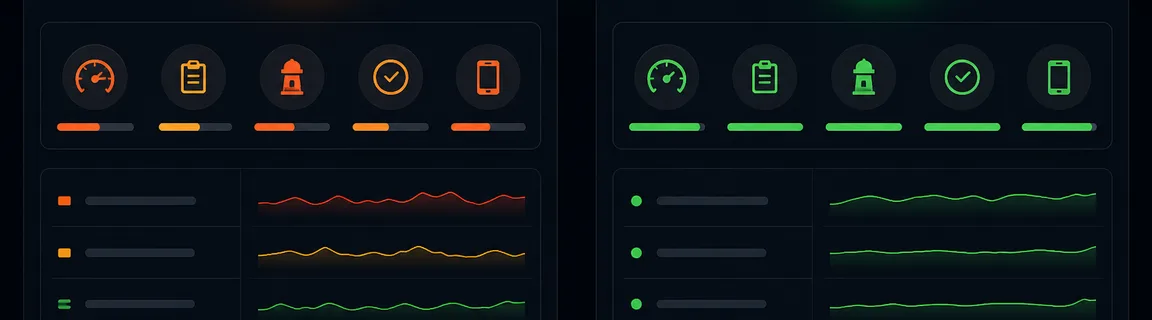
Before optimization
- LCP
- 3.8s
- Google Score
- 62/100
- File size
- 180 KB blocking CSS
- Load time
- 2.1s FCP
After optimization
- LCP
- 1.9s
- Google Score
- 91/100
- File size
- 4 KB inline + 176 KB async
- Load time
- 0.9s FCP
Improvements
The technique delivers the most value in these contexts:
Measure impact on your Core Web Vitals
Verify that Critical CSS actually improves LCP — not just the synthetic Lighthouse score. Cross lab and field data:
Compare before/after on a representative page sample. See our Core Web Vitals and fast-site SEO articles for Google thresholds and ranking impact.
Inline critical CSS in HTML
Combine inline CSS for critical rules and deferred loading for the rest. This pattern works with most stacks and avoids FOUC when noscript is present:
Before
After
Integration in modern frameworks
Next.js 13+ can optimize CSS via Critters (experimental). Enable `experimental.optimizeCss` or use `@next/critical` to generate critical CSS at build time:
App Router
In `next.config.js`: `experimental: { optimizeCss: true }` — Critters automatically inlines critical CSS for statically generated pages.
Manual build
For fine control, run `critical` post-build on `out/index.html` (static export) or SSR page snapshots.
The Vue and React ecosystems offer mature plugins that automate extraction:
Nuxt
`@nuxtjs/critters` module — automatic critical CSS injection at prerender.
Gatsby
`gatsby-plugin-critical` plugin — generates and inlines critical CSS for each page at build.
Best practices and common pitfalls
Before pushing to production, validate this list:
These issues often appear after a first Critical CSS implementation:
What is Critical CSS?
Critical CSS is the minimal set of rules needed to display above-the-fold content correctly in the initial viewport: header, hero, base typography, main layout. Every external `<link rel="stylesheet">` blocks rendering while the browser builds the CSSOM. Minification reduces size; Critical CSS reduces blocking by delivering those rules inline without a network round trip.
The most common transformation on a static or SSR page:
Before
After
Minify your Critical CSS with FastMinify
After extraction with `critical` or Penthouse, paste the CSS into FastMinify's online CSS minifier for the most compact version before inlining. Then minify the final HTML with our online HTML minifier if you serve static pages.
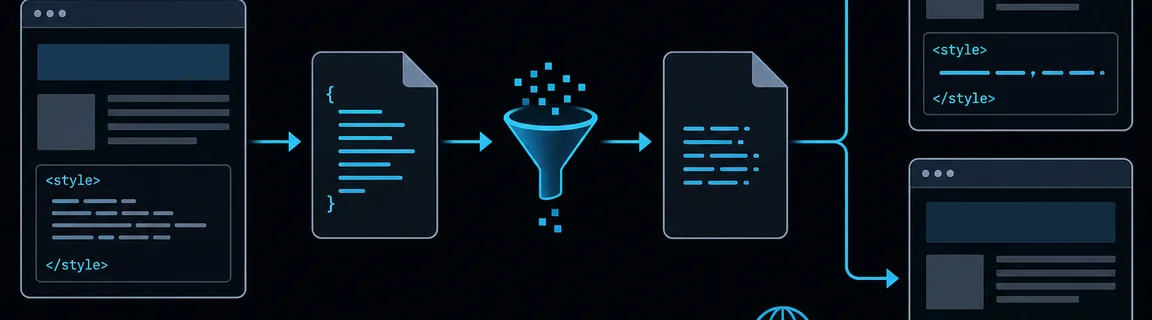
Step 1: Extract
Generate `critical.css` with critical/Penthouse on your production build (not dev — classes may differ).
Step 2: Minify
Paste extracted CSS into FastMinify. Compare before/after size — aim for under 14 KB inline when possible.
Step 3: Inline and defer the rest
Insert minified CSS in a `<style>` tag in the `<head>`. Load the full stylesheet async via preload or media print trick.
Extract critical CSS programmatically
The `critical` package is the standard way to generate critical CSS from a URL or HTML file. Configure viewport dimensions (mobile + desktop) to cover real-world cases:
Configuration
Usage
Generated CSS still contains whitespace and comments. Run it through CSSO or our online tool before inlining — see the CSS minification guide for advanced options. Typical savings: 30–50% on the extracted block.
Configuration
Usage
Conclusion
Critical CSS is one of the highest-ROI optimizations to improve LCP without rewriting your stack: extract above-the-fold styles, minify aggressively, inline in HTML, defer the rest. Combine this approach with systematic CSS minification, Brotli compression and lean HTML to maximize impact on Core Web Vitals and search rankings.
Minify your critical CSS now
Related Articles

Format a Copy as cURL, parse a raw HTTP request or response and read a HAR export in your browser: nothing is sent, nothing is replayed.

Decode a JWT header and payload, or sign a test token, right in your browser: HS256, RS256, ES256, with no secret sent to a third-party server.

Length, entropy, symbols: generate a strong password in your browser with Web Crypto, no network transit, and know what the tool does not guarantee.