Why Fast Sites Rank Better on Google: The Link Between Speed and SEO
Discover why Google favors fast sites in search results. Understand the link between web performance and SEO, and learn how to optimize your site to improve your ranking.
Why Google favors fast sites
Since 2010, Google has been using page load speed as a ranking factor in search results. This decision is not arbitrary: it's based on simple but powerful logic: fast sites provide a better user experience, and Google rewards this quality. In 2025, with the introduction of Core Web Vitals as official ranking factors and the continued strengthening of performance importance in algorithms, this relationship between performance and SEO is more important than ever. Understanding this link is essential for any website owner who wants to improve their online visibility and organic traffic.
The evolution of performance as an SEO factor
In April 2010, Google officially announced that page load speed would become a ranking factor for desktop searches. This announcement marked a turning point in SEO history, as it was the first time a purely performance-related technical factor became a ranking criterion. At the time, this decision was controversial: some webmasters believed that content should be the only ranking factor. But Google had already understood that user experience was inseparable from content quality.

In May 2021, Google introduced Core Web Vitals as official ranking factors. These three metrics (LCP, FID replaced by INP in 2024, and CLS) measure real user experience rather than just raw speed. This evolution represents a fundamental change: Google no longer just measures whether a page loads fast, but evaluates how users actually perceive this speed.
In September 2025, Google announced a strengthening of page load speed weight in its algorithm. This update confirms that performance is not a passing trend, but a fundamental pillar of modern SEO. Sites that neglect performance risk seeing their ranking degrade progressively.
Recent changes
Why Google favors fast sites
Google has a clear mission: to provide the best possible search results to its users. Fast sites offer a better user experience, which translates into positive behavioral metrics that Google uses as quality signals. Here's why speed directly impacts user experience:

Bounce rate
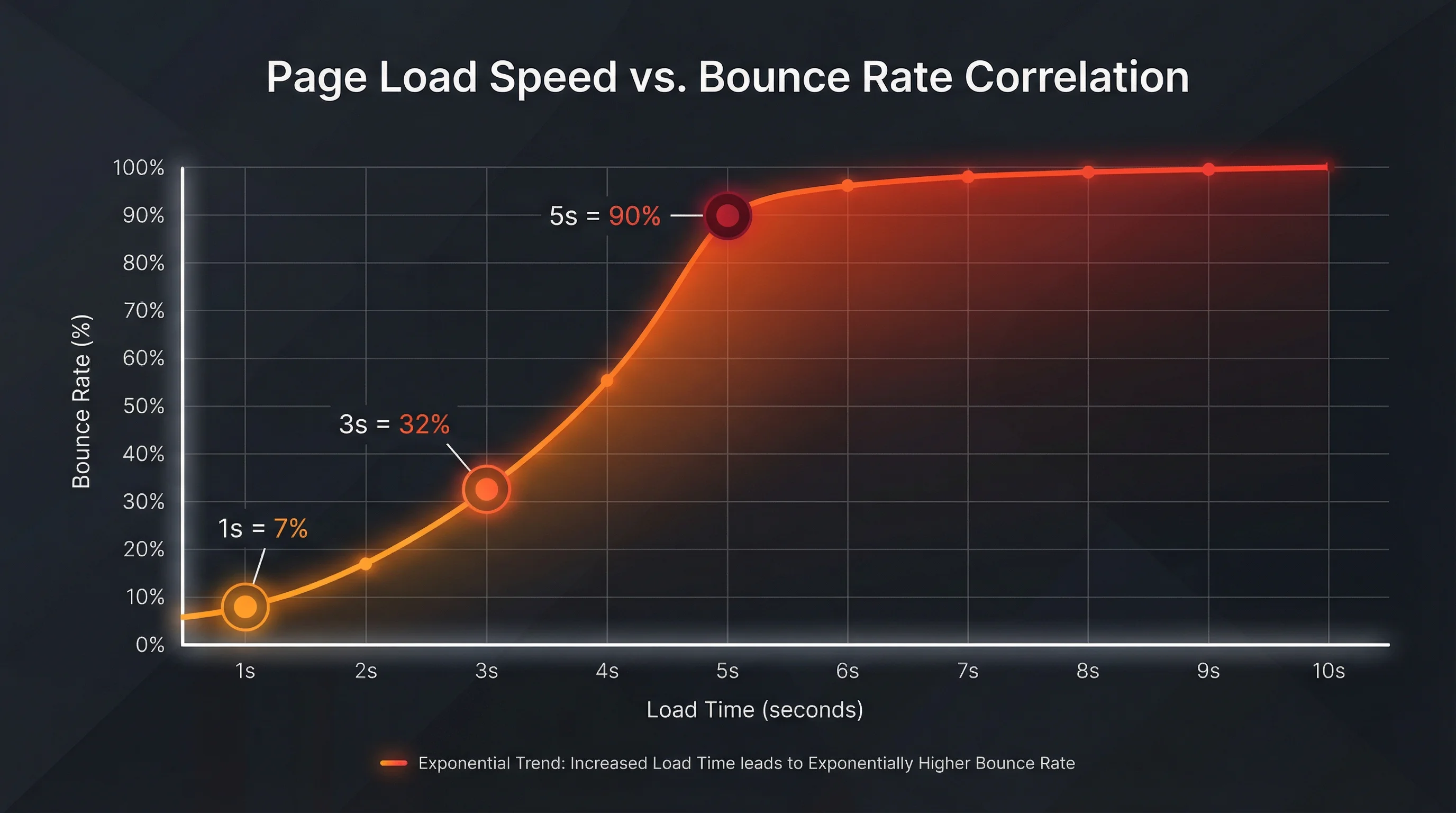
Pages that load in less than 2 seconds have an average bounce rate of 9%, compared to 38% for those that take 5 seconds or more
Conversion
Each second of load delay can reduce conversions by 7%. For an e-commerce site generating €100,000 in sales per day, a one-second improvement can represent €7,000 in additional daily sales
Mobile
53% of mobile users abandon a site that takes more than 3 seconds to load
Revenue
Walmart found that a 1-second improvement in load time increased conversions by 2% and revenue by 1%
Slow sites also cost Google more in terms of server resources and bandwidth. When a user clicks on a search result and the site is slow, they may quickly return to Google to try another result. This 'quick return' (pogo-sticking) phenomenon increases the load on Google's servers and degrades the overall user experience.
With over 60% of searches performed on mobile in 2025, Google has adopted a mobile-first approach. Since mobile connections are generally slower and less stable than fixed connections (4G, 5G vs fiber), performance becomes even more critical on mobile. Google now measures Core Web Vitals primarily on mobile, and these metrics directly influence desktop ranking as well.
Google is not the only search engine to prioritize performance. Bing, DuckDuckGo and other engines also use speed as a ranking factor. By favoring fast sites, Google ensures it remains competitive and provides the best possible experience to its users.
The impact of Core Web Vitals on SEO
Core Web Vitals measure three essential aspects of user experience. Understanding how Google uses them for ranking is crucial for optimizing your SEO:

LCP (Largest Contentful Paint)
LCP measures the time needed for the largest visible element of your page (image, video, text block or main content element) to be loaded and rendered. Google considers an optimal LCP if it's under 2.5 seconds. Between 2.5 and 4 seconds, it's acceptable but perfectible. Beyond 4 seconds, it's considered poor.
Factors:
INP (Interaction to Next Paint)
INP measures your site's responsiveness by evaluating the delay between a user interaction (click, tap, keyboard press) and when the browser visually displays the response. An optimal INP is under 200 milliseconds. INP replaced FID in 2024 because it better measures real interactivity, not just the first interaction.
Factors:
CLS (Cumulative Layout Shift)
CLS measures the visual stability of your page by detecting element shifts during loading. Each shift is measured and cumulated to give a final score. An optimal CLS is under 0.1. Between 0.1 and 0.25, it's acceptable. Beyond 0.25, it's considered poor.
Factors:
Several recent studies confirm the direct impact of performance on SEO. Here are concrete data that demonstrate why investing in performance is profitable:
SQ Magazine, 2025
Sites with 'Good' scores on all three Core Web Vitals are 34% more likely to rank in the top 10 of Google results. This study analyzed over 1 million web pages.
The study also revealed that sites with a single poor Core Web Vital saw their organic traffic reduced by 15-20%, while those with all three poor metrics lost up to 40% of their traffic.
Sellthru.me, 2025
Pages that load in less than 2 seconds have an average bounce rate of 9%, compared to 38% for those that take 5 seconds or more. This 29 percentage point difference has a direct impact on Google ranking.
The study also showed that each additional second of loading increased bounce rate by 7-8 percentage points on average.
Google Search Central, 2025
Load speed has been a confirmed ranking factor since 2010, with continued strengthening of its importance. In September 2025, Google even increased the weight of speed in the algorithm.
Google now explicitly recommends optimizing Core Web Vitals to improve SEO, confirming that these metrics are directly linked to ranking.
Waterfaller.dev, 2025
Sites with an LCP under 2.5 seconds maintained ranking stability, while those with a CLS above 0.25 experienced significant volatility after algorithm updates.
This volatility can cause loss of several positions in search results, directly impacting organic traffic.
Before optimization
- LCP
- 4.5s
- INP
- 350ms
- CLS
- 0.22
- Google Position
- Position 15-20
- Organic traffic
- 1000 visits/month
- Bounce rate
- 65%
- Conversion rate
- 1.8%
- Revenue
- $1800/month
After optimization
- LCP
- 2.1s
- INP
- 120ms
- CLS
- 0.05
- Google Position
- Position 3-5
- Organic traffic
- 2800 visits/month
- Bounce rate
- 32%
- Conversion rate
- 3.2%
- Revenue
- $4480/month
Improvements
Performance impact by sector
In the e-commerce sector, performance has a direct and measurable impact on revenue. Studies show that:

French e-commerce site (anonymized)
Before
After
For media and content sites, performance directly impacts engagement and social shares:
For SaaS applications, performance on first visit is crucial for converting visitors into users:
Indirect performance signals
Performance indirectly influences SEO through user behavioral signals. Google uses these metrics as indicators of content quality and user experience:
Fast sites naturally generate more engagement, which translates into more social shares and natural backlinks:
Fast sites create a better first impression, which encourages users to return:
Common mistakes that harm your SEO
One of the most common mistakes is optimizing only for desktop. With 60%+ of searches on mobile, neglecting mobile performance is a critical error:

Many sites optimize only their homepage, neglecting internal pages that often generate more organic traffic:
Some poorly done optimizations can harm performance and SEO:
How to optimize your site to improve your SEO
Here are the main optimizations to implement to improve your performance and SEO. These optimizations have a direct and measurable impact on your Core Web Vitals and Google ranking:
Code minification
Reducing the size of your JavaScript, CSS and HTML files can improve load time by 40 to 80%. Minification removes spaces, comments and unnecessary characters without changing code functionality.
Server compression
Enable GZIP or Brotli compression on your server to reduce the size of transferred files. Compression can reduce text file size by 70 to 90%.
Image optimization
Compress and properly format your images (WebP, AVIF) to reduce their weight. Images often represent 50-70% of a page's total weight.
Caching
Configure browser and server caching to reduce repeated requests. Caching can drastically reduce load time for returning visitors.
Code splitting and lazy loading
Load only the code needed for the visible page and defer loading the rest. This reduces initial load time.
Web font optimization
Web fonts can slow down loading and cause layout shifts. Optimize them to improve performance.
Start with optimizations that have the most impact on your Core Web Vitals and SEO. Here's a prioritized action plan:

Priority 1: Maximum impact (do first)
These optimizations have the greatest impact on your Core Web Vitals and SEO. Do them first:
Priority 2: Significant impact (do next)
These optimizations have a significant impact and are relatively easy to implement:
Priority 3: Advanced optimizations (to go further)
These optimizations require more time and expertise but can bring additional gains:
Measuring the impact of your optimizations
To track the impact of your optimizations on SEO, use these free and paid tools. Each tool brings a different perspective:
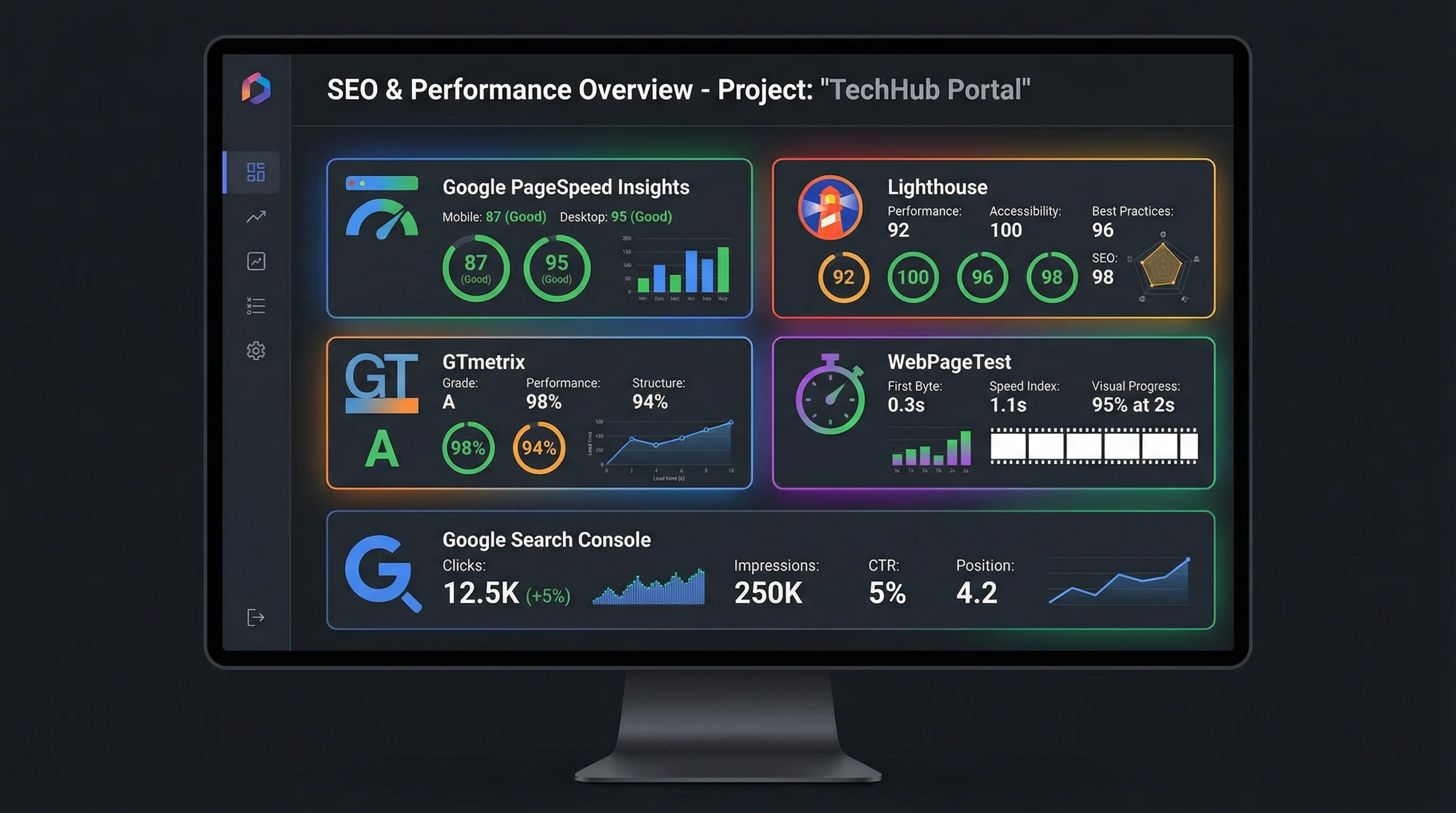
Google Search Console
Google's free tool to monitor your presence in search results. Essential for tracking the SEO impact of your optimizations.
Metrics: Average position, impressions, clicks, Core Web Vitals, click-through rate (CTR), indexed pages
Usage: Regularly check (weekly) your average position, impressions and clicks. Monitor the Core Web Vitals section to see the evolution of your metrics.
PageSpeed Insights
Google's free tool that analyzes your page performance and provides detailed recommendations. Uses real Chrome user data.
Metrics: Performance score (0-100), Core Web Vitals (LCP, INP, CLS), optimization opportunities, diagnostics
Usage: Test your main pages (homepage, category pages, popular articles) before and after optimization. Aim for a score of 90+.
Google Analytics
Google's free tool to track user behavior and measure impact on conversions.
Metrics: Bounce rate, session time, pages per session, conversion rate, revenue generated
Usage: Create segments to compare performance before/after optimization. Monitor the evolution of bounce rate and session time.
Chrome User Experience Report (CrUX)
Access real performance data for your site based on real Chrome users. Available in Google Search Console and via the public API.
Metrics: Aggregated Core Web Vitals data based on real users, breakdown by connection type (4G, 5G, etc.)
Usage: Consult CrUX data in Google Search Console to see how real users perceive your site.
Lighthouse (Chrome DevTools)
Tool integrated into Chrome DevTools to audit performance, accessibility, SEO and best practices.
Metrics: Performance score, Core Web Vitals, optimization opportunities, detailed audits
Usage: Use Lighthouse in incognito mode to avoid extensions that can skew results. Regularly test your main pages.
WebPageTest
Free and open-source tool to test your page performance from different locations and connections.
Metrics: Detailed load time, waterfall chart, Core Web Vitals, recommendations
Usage: Test from different locations (USA, Europe, Asia) and connection types (3G, 4G, fiber) to see the impact on different users.
Monitor these key indicators to measure the impact of your optimizations on SEO and performance:
Metrics to track
Understanding how to interpret your optimization results is crucial for adjusting your strategy:
How to interpret results
Average position
A 5-10 position improvement can take 2-4 weeks after optimization. Significant improvements (15+ positions) can take 2-3 months.
Core Web Vitals
Core Web Vitals are updated daily in Google Search Console, but changes can take a few days to appear.
Organic traffic
Organic traffic increase generally follows position improvement with a 2-4 week delay.
Try our free minification tools to optimize your code:
JavaScript Minifier
Minify, unminify and beautify your JavaScript code instantly.
CSS Minifier
Optimize your CSS stylesheets for better performance.
JSON Formatter
Format minified JSON with customizable indentation — dedicated JSON tools cluster.
SVG Optimizer (SVGO)
Deep SVGO optimization beyond quick minify — safe, default and aggressive presets.
Prepare strings for URLs, markup, or API payloads — everything stays in the browser:
Base64
Encode or decode UTF-8 text as Base64, including URL-safe alphabet.
URL encode
Percent-encode query components or full URIs with encodeURIComponent, encodeURI, or form scopes.
URL decode
Decode percent-encoded query strings and URLs — component, full URI, or form-urlencoded.
HTML entities
Escape or unescape &, <, quotes, and named entities before inserting into markup.
Conclusion: Performance, a profitable investment for your SEO
The relationship between web performance and SEO is no longer in doubt. Google clearly favors fast sites, and this trend is only intensifying with the introduction of Core Web Vitals and the continued strengthening of performance importance in algorithms. Investing in optimizing your site's performance is not just a technical matter: it's a strategic investment that can significantly improve your online visibility, organic traffic and conversions. Studies show that performing sites see their organic traffic increase by 25-40% on average, with ranking improvements of 5-15 positions. For an e-commerce site, this can represent tens of thousands of euros in additional monthly revenue. Performance optimization is no longer an option, it's a necessity to succeed online in 2025.
Related Articles

Decode a JWT header and payload, or sign a test token, right in your browser: HS256, RS256, ES256, with no secret sent to a third-party server.

Length, entropy, symbols: generate a strong password in your browser with Web Crypto, no network transit, and know what the tool does not guarantee.

Test a JavaScript regex, inspect capture groups, and preview a $1 replace in the browser before the pattern lands in production code.