OpenAPI: Lint, Format and Structure a Maintainable API
operationId, tags, error responses: practical rules that prevent spec debt when you lint and format OpenAPI files online.
Why lint and format OpenAPI specs before merging?
A spec can pass schema validation yet still ship without operationId, missing tags, or only a default response — and that technical debt shows up weeks later when SDK generators, API portals, or contract tests fail silently. Formatting alone does not fix those gaps; linting catches style and completeness rules that validators ignore. FastMinify's online OpenAPI linter applies a fixed Spectral-style subset on path operations, entirely in your browser. Pair it with the OpenAPI formatter for readable PR diffs and the OpenAPI validator for schema conformance. Start with our OpenAPI validation guide if structural errors block you first, then explore the API tools hub.
Honest limits and maintainable API design
A passed lint status means no issues in the v1 rule subset — not that your API is production-ready or fully documented.
These fields prevent spec debt that validators miss but generators and portals require.
operationId: stable, unique, camelCase — avoid renaming without a deprecation plantags: group by domain or bounded context — match your developer portal sectionsinfo.description and info.contact: lint warns when missing — fill them for external APIs/pet-orders over /petOrders — kebab-case rule aligns with REST conventionsBrowser tools accelerate feedback; pipelines enforce org-wide policy.
$ref resolutionDesign-first: validate, format, then lint
Do not swap steps during review — each tool answers a different question about your OpenAPI file.
FastMinify lint is not full Spectral — it ships a fixed rule set focused on maintainable path operations (ADR-OAS-009).
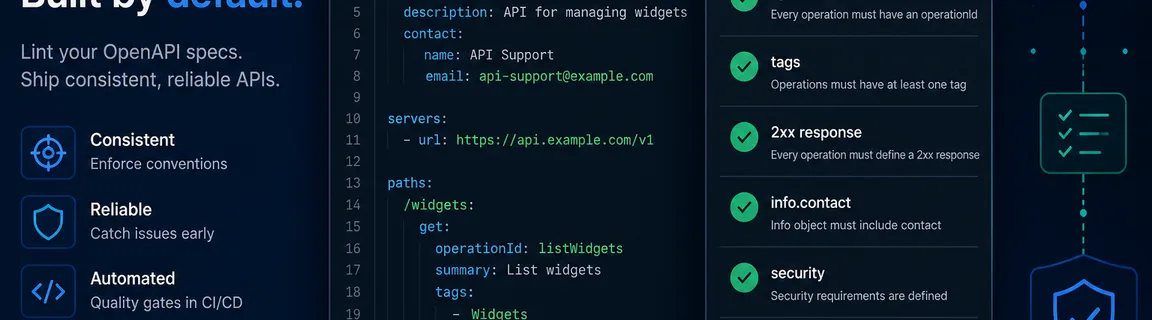
not-openapi (error): root must be OpenAPI 3.x with an info object — gate before other rulesinfo-contact (warning): info.contact should be presentinfo-description (warning): non-empty info.descriptionpaths-kebab-case (warning): path segments should be kebab-case or vNoperation-operationId (warning): every operation needs a non-empty operationIdoperation-tags (warning): at least one tag per operationoperation-description (warning): summary or description requiredoperation-success-response (error): at least one 2xx response — default alone does not countpath-item-ref (warning): path item $ref not expanded in v1 lintHonest scope — avoid assuming parity with Spectral, Redocly, or gateway policy engines.
webhooks and callbacks are out of scope in v1$ref URL fetch — paste a self-contained specThe formatter pretty-prints JSON or YAML (2 or 4 space indent) and can sort keys recursively for stable diffs.
openapi: 3.0 in YAML normalizes to string 3.0.0Lint and format OpenAPI: step-by-step workflow
The OpenAPI linter parses JSON or YAML (max 512 KiB), checks the not-openapi gate, then runs path-operation rules. Status: passed, passed with warnings, or failed — never a plain green when warnings exist.
The OpenAPI formatter pretty-prints for human review. Auto-format on paste; use the Format button (⌘↵) after manual edits.
Your mobile pipeline generates a client from the spec — warnings you ignored become hard failures downstream.
Step 1: Validate schema conformance
Paste into validate-openapi. Fix Scalar errors first — lint will not help on a structurally invalid spec.
Step 2: Lint path operations
Open lint-openapi. Resolve operation-operationId and operation-tags warnings on every public endpoint.
Step 3: Format and open the PR
Run the fixed spec through format-openapi with key sort if your team uses stable diffs. Re-lint before commit.
A designer exports minified YAML — reviewers cannot spot accidental path renames.
Step 1: Format for readability
Paste into format-openapi, pick 2-space indent, enable sort keys if the team agrees.
Step 2: Validate then lint
Validate with Scalar, then lint for paths-kebab-case and operation-success-response on new endpoints.
Step 3: Document error responses
Lint enforces 2xx presence — manually add 4xx/5xx responses with descriptions for production-grade contracts (not covered by v1 lint errors).
PR review workflow: from design-first to merge
Treat the browser trio as a fast gate before git push — CI remains the team source of truth, but catching issues locally saves pipeline minutes. Order: (1) validate-openapi — fix Scalar errors; (2) format-openapi — readable diff; (3) lint-openapi — resolve errors, then warnings per team policy; (4) commit.
Beyond green validate, ask: Are operationId values unique and stable for codegen? Do tags map to your API portal navigation? Does every operation document at least one success response — and are common error shapes described for client teams?
In CI, teams often run Spectral, openapi-cli, or Redocly with custom rulesets stricter than FastMinify v1. Combine browser lint with our CI/CD automation guide. For schema pivots, use json-schema-to-openapi and openapi-to-json-schema on the hub. To validate payloads against a schema once the contract is sound: see our JSON Schema validation guide.
Conclusion
Maintainable OpenAPI specs need more than schema validation: lint catches the operationId, tag, and response gaps that block generators, and formatting keeps PRs reviewable. Validate first, format for humans, lint for style — all locally before CI. Explore the API hub for JSON Schema conversion and GraphQL SDL validation when your contract work expands beyond REST.
Related Articles

Test a JavaScript regex, inspect capture groups, and preview a $1 replace in the browser before the pattern lands in production code.

Random UUID v4, sortable UUID v7 and ULID, or compact customizable Nanoid: a comparison and online generators for primary keys, public IDs and tokens.

Compute an MD5 or SHA digest, or sign a message with HMAC, in the browser. Hex, Base64 or Base64URL — text checksums and webhook signatures, 100% local.