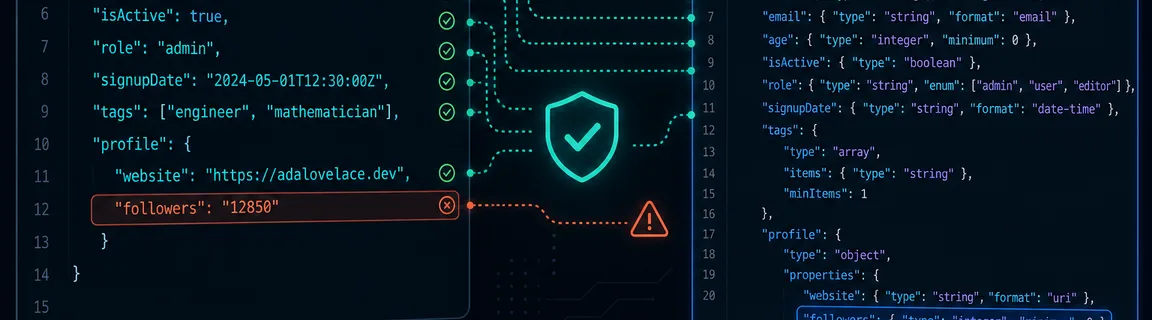
JSON Schema: Validate Data Online (Draft 2020-12)
Test API payloads and config files against JSON Schema Draft 2020-12 — errors pinpointed by JSON Pointer path, in the browser.
Why validate JSON data against a schema?
Valid JSON is not the same as valid for your API. A payload can parse perfectly yet miss a required field, ship the wrong type, or violate a format constraint — and those bugs often surface only in integration tests or production logs. JSON Schema answers a different question than syntax checking: does this instance conform to the contract? FastMinify's online JSON Schema validator runs Draft-07 and 2020-12 validation in dual Monaco editors (schema + instance), entirely in your browser. Pair it with the JSON validator when syntax is suspect first, and with validate-openapi when the contract lives in OpenAPI. Explore the API tools hub for schema conversion and OpenAPI linting siblings.
Honest limits and maintainable schemas
A green result means the instance matched the pasted schema — not that your entire API platform is compliant.
https:// $ref never resolveSchemas that validate cleanly in-browser tend to survive CI and SDK generation.
$schema in shared files — avoid implicit 2020-12 assumptionsadditionalProperties: false only when you enforce closed objects deliberatelyexamples in OpenAPI and paste them as validator instances in reviewsdescriptionBrowser checks save pipeline minutes; org policy still lives in CI.
JSON syntax vs JSON Schema validation
Do not swap tools mid-debug — each answers a distinct failure mode.
FastMinify detects the draft from $schema when present; missing $schema defaults to 2020-12.
https://json-schema.org/draft/2020-12/schemahttp://json-schema.org/draft-07/schema#components.schemasWhen validation fails, Ajv reports where the instance broke the schema — essential for large API payloads.
instancePath points to the failing value (JSON Pointer style)required, type, format, …)required schema → path / or missing property pathsValidate JSON against a schema: step-by-step
The JSON Schema validator provides two editors: Schema (left) and Instance (right). Paste JSON into each field — YAML is not accepted in the schema editor (JSON only). Max 512 KiB per field.
Strict mode turns on Ajv strict: true at schema compile time — unknown keywords and other non-strict schema patterns fail before instance validation.
components.schemasYour mobile client crashes on a new field shape — the response is valid JSON but breaks the published schema.
Step 1: Confirm JSON syntax
Paste the response into json-validator. If syntax fails, repair before schema validation.
Step 2: Paste schema and instance
Open json-schema-validator. Paste the canonical schema (from OpenAPI export or schema registry) and the staging response.
Step 3: Read instancePath errors
Fix the API or update the schema with a deprecation plan. Re-validate after deploy. Optionally diff staging vs production payloads.
A team shares JSON config validated in CI with JSON Schema — you need a quick local check without cloning the pipeline.
Step 1: Load schema from repo
Copy the schema JSON (self-contained — external $ref are not resolved in-browser).
Step 2: Validate your edit
Paste the edited config as the instance. Enable Strict if the schema is authored for strict review.
Step 3: Chain with YAML tools if needed
Configs often start as YAML — convert with yaml-to-json, validate syntax, then schema-validate the JSON instance.
OpenAPI, components.schemas, and conversion
REST teams often publish shapes in OpenAPI components.schemas while JSON Schema registries store standalone files — the validator accepts either once extracted as JSON. Workflow: validate-openapi (spec envelope) → extract schema → json-schema-validator (payload vs schema). See our OpenAPI validation guide and lint & format guide for the spec side of the contract.
When the schema source is the OpenAPI file, pivot formats on the hub without a local CLI: openapi-to-json-schema extracts a schema from OpenAPI components; json-schema-to-openapi wraps a standalone schema into an OpenAPI shell for portal import.
Browser validation accelerates feedback; CI still owns regression suites. Paste representative instances — happy path, edge nulls, enum boundaries. Document the draft in $schema next to every shared schema file in git.
Common validation failures
These show up constantly in support tickets and flaky CI jobs.
required property — instancePath points at parent or /type — string where integer expected (common after form serialization)additionalProperties: false — extra fields from API versioning mistakesformat violations — date-time, email, uuid (via ajv-formats)enum mismatch — undocumented status codes or region codes in payloadsStrict mode and unsupported drafts surface here before instance validation runs.
$schema URL — upgrade to Draft-07 or 2020-12$ref — hard error; inline or bundle refs locally firstdescription / vendor extensions per policyConclusion
JSON Schema validation closes the gap between parseable JSON and trustworthy API data. Start with syntax when needed, then validate instances against Draft-07 or 2020-12 schemas with clear instancePath errors — locally before CI. Extract schemas from OpenAPI when contracts live in specs, and keep browser checks honest about refs, drafts, and size limits.
Related Articles

Test a JavaScript regex, inspect capture groups, and preview a $1 replace in the browser before the pattern lands in production code.
Random UUID v4, sortable UUID v7 and ULID, or compact customizable Nanoid: a comparison and online generators for primary keys, public IDs and tokens.

Compute an MD5 or SHA digest, or sign a message with HMAC, in the browser. Hex, Base64 or Base64URL — text checksums and webhook signatures, 100% local.