Unix Timestamps: Convert Epochs and Avoid Time Zone Mistakes

Unix Timestamps: Convert Epochs and Avoid Time Zone Mistakes

Convert a Unix epoch to a readable date and back, tell seconds from milliseconds, and avoid time zone, JWT and clock change traps, all in your browser.

19.10.2026
18 min read
Share this article:
Unix timestampEpochTime zoneJWTTutorial

An epoch is a count of seconds with no time zone

A number such as 1710000000 or 1710000000000 turns up in a log line, an API response, a JWT or a database column. It counts the time elapsed since 1 January 1970 at 00:00:00 UTC, counted as seconds or as milliseconds. It carries no time zone. The Unix timestamp converter turns an epoch into a date and a date into an epoch. Empty fields follow a live clock. Type an epoch, an ISO date or a local date and time, and the other two fields update. A table gives the epoch as seconds and as milliseconds, then ISO 8601, RFC 2822, an SQL datetime, a text in your language and a relative time. It shows them in UTC or in your browser's time zone. The conversion happens in your tab and nothing is sent. This guide reads an epoch digit by digit, then shows what a time zone changes and what it leaves alone. It covers the mistakes that cost the most: seconds read as milliseconds, a JWT that never expires, a date written without a zone and a clock change. It also gives the limits of 2038 and of other epochs, and the same conversions in JavaScript, Python, a shell and Java. Related tools are listed in the developer utilities hub.

A live clock at the top of the page, with the current epoch as seconds and as milliseconds, a Pause button and a Copy ISO (UTC) button
Three linked fields: Unix epoch, ISO / date text, and Local date/time. Edit one and the other two follow
Automatic unit: up to 10 digits are read as seconds, 11 to 15 digits as milliseconds, and a badge says which one was chosen
A format table with a Copy button on each row: epoch (seconds), epoch (milliseconds), ISO 8601, RFC 2822, SQL datetime, locale string and relative time
UTC or Local display. Local means the time zone of your browser: the tool has no list of zones
Negative epochs and fractions of a second are accepted, and values with more than 15 digits are rejected rather than cut
No upload: the calculation stays in the browser

What the converter is for, and where it stops

Good uses

The converter answers two questions: which moment does this number name, and which number names this moment?

Read an epoch from a log line, an API field or a database row, and check the badge to see whether the tool took it for seconds or for milliseconds
Write a date into an epoch for a query, a fixture or a test, and copy the row you need
Switch between UTC and Local to see how far a zone moves the same moment, and which day it falls on
Check the <code>exp</code>, <code>iat</code> and <code>nbf</code> claims of a token by pasting each number and setting the unit to Seconds
Paste the ISO 8601 row into a ticket or a code review, so the reader sees the date with its offset
Use Pause on the live clock to keep an epoch still while you copy it
What belongs elsewhere

The converter reads one value at a time. The rest of the chain is checked somewhere else.

Decode a token to read its claims: the <a href="/en/jwt-decode" class="text-primary hover:underline">JWT decoder</a> shows <code>exp</code> as the raw number from the payload, and the <a href="/en/blog/jwt-encode-decode-online-guide" class="text-primary hover:underline">JWT guide</a> explains the claims
Read when a schedule fires: the <a href="/en/cron-parser" class="text-primary hover:underline">cron parser</a> calculates the next runs, and the <a href="/en/blog/cron-expression-parser-guide" class="text-primary hover:underline">cron guide</a> covers time zones and clock changes in that context
Turn a web server log into a table: the <a href="/en/access-log-to-table" class="text-primary hover:underline">access log to table</a> tool keeps the date as written, for example <code>09/Mar/2024:16:00:00 +0000</code>, which the converter rejects. Rewrite it as <code>2024-03-09T16:00:00+00:00</code> first
Pick a named zone such as Tokyo: the converter offers UTC and the zone of your browser only. Use <code>Intl.DateTimeFormat</code> or your language's time zone library (see the code below)
Read microseconds, nanoseconds or a Windows FILETIME: they have 16 digits or more and are rejected. Divide by 1000 or by 10 000 000 yourself, and subtract the epoch offset where there is one
Convert a whole file: the tool reads one value at a time
Add a month or a year to a date: use a date library, because a day is not always 86 400 seconds on a local clock

Reading a value without mistakes

Telling seconds from milliseconds by the digits

In Auto mode the tool counts the digits of the whole part, ignoring the sign. The examples below can be pasted into the Unix epoch field.

<code>1710000000</code> has 10 digits and is read as seconds: Saturday 9 March 2024 at 16:00:00 UTC. The badge says "Inferred: seconds"
<code>1710000000000</code> has 13 digits and is read as milliseconds. It gives the same moment, and the badge says "Inferred: milliseconds"
From 9 September 2001 (<code>1000000000</code>) to 20 November 2286 (<code>9999999999</code>), a seconds epoch has 10 digits. Over the same period a milliseconds epoch has 13 digits
<code>10000000000</code> has 11 digits and is read as milliseconds: 26 April 1970 at 17:46:40 UTC. Read as seconds, a value of that size would be the year 2286
A date in January 1970 almost always means that seconds were read as milliseconds. <code>1710000000</code> read as milliseconds is 20 January 1970 at 19:00:00 UTC. Set Unit to Milliseconds to see it
A date in the year 56157 means the opposite. <code>1710000000000</code> read as seconds gives <code>+056157-09-28T16:00:00.000Z</code>. Set Unit to Seconds to see it
From 16 digits, the tool answers "This value looks more precise than milliseconds" and shows no date
Fractions, signs and what the field refuses

The Unix epoch field accepts digits, an optional minus sign and a decimal point.

<code>1710000000.5</code> is 16:00:00.500 UTC. Python's <code>time.time()</code> returns this kind of value: seconds with a fraction
Digits beyond the millisecond are cut, not rounded: <code>1710000000.123456</code> gives 16:00:00.123
<code>0</code> is 1 January 1970 at 00:00:00 UTC, <code>-1</code> is 31 December 1969 at 23:59:59 and <code>-86400</code> is 31 December 1969 at 00:00:00. POSIX leaves negative values undefined, but JavaScript and Python handle them
A comma as decimal separator (<code>1710000000,5</code>), an exponent (<code>1e9</code>) and a hexadecimal value are refused with "Could not parse this input"
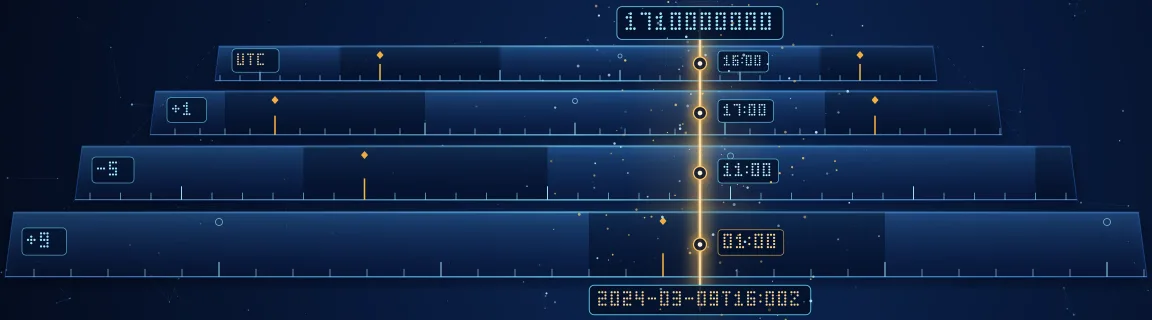
The same moment in four zones

Take 1710000000. The epoch does not change, only its reading does. Switch Timezone to Local to see the line for your own zone.

UTC: Saturday 9 March 2024 at 16:00:00
Paris: 17:00:00, UTC+1 (winter time until 31 March 2024)
New York: 11:00:00, UTC-5. The United States switched to daylight time the next day, 10 March 2024, and New York has been at UTC-4 since
Tokyo: Sunday 10 March 2024 at 01:00:00, UTC+9. The zone also moves the day, which matters when you cut logs by day
The Local date/time field is always your browser's wall clock, even when the table is set to UTC. A hint under the field says so
Date text with or without a zone

Type a date in the ISO / date text field to get its epoch. The result depends on what you wrote after the time. The values below were checked in Node 26, which uses the same JavaScript engine as Chrome. Other browsers may read the non-ISO forms differently.

<code>2024-03-09T16:00:00Z</code> gives <code>1710000000</code> in every browser zone, because the <code>Z</code> says UTC
<code>2024-03-09T16:00:00+01:00</code> gives <code>1709996400</code>, which is 15:00 UTC
<code>2024-03-09T16:00:00</code> has no offset and is read in the zone of the browser: <code>1710000000</code> in UTC, <code>1709996400</code> in Paris, <code>1710018000</code> in New York and <code>1709967600</code> in Tokyo
<code>2024-03-09</code>, a date alone, is read as midnight UTC: <code>1709942400</code> in every zone. Adding a time without an offset changes the rule
<code>2024-03-09 16:00:00</code> with a space and <code>March 9, 2024</code> are not ISO forms. the engine tested here reads them in local time, and the standard leaves the rule to each engine
<code>09/03/2024</code> is read with the month first, as 3 September 2024. A format with day first needs rewriting as ISO
<code>Sat, 09 Mar 2024 16:00:00 GMT</code>, the RFC 2822 form from HTTP headers, is understood and gives <code>1710000000</code>

Five mistakes you only see in production

Passing seconds where milliseconds are expected, or the reverse

JavaScript counts in milliseconds, most other languages and protocols count seconds. new Date(1710000000) gives 20 January 1970 at 19:00:00 UTC. In Python 3.14, datetime.fromtimestamp(1710000000000, tz=timezone.utc) stops with "year must be in 1..9999, not 56157". Java has two methods, Instant.ofEpochSecond and Instant.ofEpochMilli, and nothing warns you if you pick the wrong one.

Passing the result of <code>Date.now()</code> to a function that expects seconds, or the result of <code>time()</code> to <code>new Date()</code>
Dividing by 1000 twice, or never, along a chain of three services
Storing milliseconds in a 32-bit integer column, which holds at most 2 147 483 647
Reading nanoseconds with <code>JSON.parse</code>: 1710000000123456789 comes back as 1710000000123456800, because JavaScript numbers are exact only up to 9 007 199 254 740 991. Read the field as a string or a BigInt
Comparing a seconds field with a milliseconds field, and getting a result that is always true or always false
Write the unit in the name (<code>created_at_ms</code>, <code>expires_in_s</code>) and in the API description, and test with a value you can read, such as the epoch of today at noon.
A JWT that expires in the year 56157

RFC 7519 defines exp, nbf and iat as seconds since the epoch, with leap seconds ignored. A token signed with exp set to Date.now() + 3600000 carries milliseconds. With the jose library, version 6, such a token signed on 9 March 2024 still verified when the check date was set to 2034. Its exp of 1710003600000, read as seconds, is +056157-11-09T08:00:00.000Z. The converter hides the bug if you leave Unit on Auto, because it reads 13 digits as milliseconds and shows a normal date.

Setting <code>exp</code> from a millisecond clock, as in <code>Date.now() + 3600 * 1000</code>
Pasting <code>exp</code> into the converter with Unit on Auto, and concluding that the date is fine
Trusting the verifier: it compares numbers and cannot know which unit you meant
Mixing <code>iat</code> as seconds with <code>exp</code> as milliseconds in the same payload, so that the token seems to live forever
Decode the token, then paste <code>exp</code> with Unit set to Seconds. A date in 2026 is correct. A date after the year 3000 is a bug.
Reading a date without a zone

A date text without an offset names no moment until a zone is chosen. Python's datetime(2024, 3, 9, 16, 0, 0).timestamp() on a machine set to Paris gives 1709996400, not 1710000000. JavaScript reads 2024-03-09 as midnight UTC but 2024-03-09T00:00:00 as midnight local time, so two spellings of the same day differ by the offset of the machine.

Storing a local wall-clock time as if it were UTC, then showing it to users in another zone
Getting a different epoch for the same string on a laptop in Paris and on a server in UTC
Cutting logs by day in UTC while the readers work in another zone: <code>1710000000</code> is already the 10th in Tokyo
Writing a date in a fixture without a zone, so that a test passes in one country and fails in another
Write the offset or a <code>Z</code> on every date you exchange. Store the epoch or the UTC date, and apply a zone only when you display it.
Trusting a local hour across a clock change

Europe goes back to winter time on Sunday 25 October 2026, at 01:00 UTC. In Paris, 03:00 becomes 02:00, so 02:30 happens twice: at 00:30 UTC (1792888200) and at 01:30 UTC (1792891800). With the browser set to Paris, the Local date/time field takes the first one. On 29 March 2026 the hour from 02:00 to 03:00 does not exist, and the field answers that it cannot parse 02:30. The epoch removes the doubt, because it names one moment.

Adding 86 400 seconds to get "the same time tomorrow". From 09:00 in Paris on 24 October 2026, it gives 08:00 on the 25th, because that day lasts 25 hours
Storing a local time without its offset, and finding two possible epochs after the clock goes back
Scheduling a job at 02:30 local time and having it run twice, or not at all (the cron guide covers this case)
Believing that two local times 24 hours apart are always 86 400 seconds apart
Do the arithmetic on epochs or UTC dates, and convert to local time only for display. Use a date library when you need "the same hour tomorrow".
Forgetting the limits of the format

An epoch is easy to store and easy to overflow. The limits below come from the width of the type that holds it.

Keeping an epoch in a signed 32-bit integer: the last second is <code>2147483647</code>, 19 January 2038 at 03:14:07 UTC. One second later it wraps to a date in 1901
Using a MySQL <code>TIMESTAMP</code> column for a date after 2038: the documentation gives '2038-01-19 03:14:07' UTC as its upper bound
Using an unsigned 32-bit integer and assuming it is safe: it ends at <code>4294967295</code>, and <code>4294967296</code> is 7 February 2106 at 06:28:16 UTC
Expecting leap seconds: Unix time counts each day as exactly 86 400 seconds, so the difference between two epochs can be a second short of the elapsed time
Use a 64-bit integer or a native date type, and test the boundary values <code>2147483647</code> and <code>4294967296</code> in the converter.

Units, limits and other epochs at a glance

The unit used by each system

Check the documentation of the system that produced the number before you trust its digits.

JavaScript: <code>Date.now()</code> and <code>getTime()</code> return milliseconds
Python: <code>time.time()</code> returns seconds as a float, and <code>time.time_ns()</code> returns nanoseconds
Java: <code>System.currentTimeMillis()</code> returns milliseconds, and <code>Instant.getEpochSecond()</code> returns seconds
PHP: <code>time()</code> returns seconds, and <code>microtime(true)</code> returns seconds as a float
Shell: <code>date +%s</code> prints seconds. GNU date also prints milliseconds with <code>date +%s%3N</code>
JWT: <code>exp</code>, <code>nbf</code> and <code>iat</code> are always seconds, and RFC 7519 allows a fraction
The FastMinify converter: seconds for up to 10 digits, milliseconds for 11 to 15 digits, and a rejection from 16 digits
Numbers worth knowing

You will spot these values quickly once you have seen them, and every one can be pasted into the converter.

<code>0</code>: 1 January 1970 at 00:00:00 UTC, the origin
<code>1000000000</code>: 9 September 2001 at 01:46:40 UTC, the first epoch with 10 digits
<code>2147483647</code>: 19 January 2038 at 03:14:07 UTC, the end of a signed 32-bit integer
<code>4294967296</code>: 7 February 2106 at 06:28:16 UTC, one past an unsigned 32-bit integer
<code>9999999999</code>: 20 November 2286 at 17:46:39 UTC, the last epoch with 10 digits
<code>8640000000000</code> seconds: 13 September 275760, the last date a JavaScript <code>Date</code> can hold. With Unit set to Seconds, the tool accepts it and refuses one second more
Epochs that do not start in 1970

Some systems count from another origin or in another unit. If a date comes out decades off, look for one of these.

Windows FILETIME: 100-nanosecond steps since 1 January 1601. The offset to Unix is 11 644 473 600 seconds. For <code>1710000000</code>, FILETIME is 133544736000000000, which has 18 digits and is rejected by the converter
Apple absolute time (Core Data, Cocoa): seconds since 1 January 2001, an offset of 978 307 200 seconds. <code>1710000000</code> becomes 731692800
GPS time: seconds since 6 January 1980, an offset of 315 964 800 seconds. It ignores leap seconds, so the gap with UTC grows over time
.NET ticks: 100-nanosecond steps since 1 January 0001. The Unix epoch is at 62 135 596 800 seconds from that origin
Excel and Google Sheets serial dates: days since 30 December 1899 in the default system. 1 January 1970 is day 25 569, and <code>1710000000</code> is 45360.67 (the fraction is the hour)

The Unix timestamp converter, step by step

Reading an epoch

The Unix timestamp converter updates a short moment after you stop typing. There is no Convert button.

1

Look at the live clock

The block "Current Unix time" shows the epoch as Seconds and as Milliseconds, each with a Copy button. Pause stops the clock and Resume restarts it. Copy ISO (UTC) takes the current date.

2

Type or paste the epoch

Use the Unix epoch field. A badge such as "Inferred: seconds" shows how the digits were read. You can force Seconds or Milliseconds with the Unit option.

3

Read the Formats table

It lists the epoch as seconds and as milliseconds, ISO 8601, RFC 2822 and an SQL datetime. It adds a locale string in the language of the page and a relative time. RFC 2822 uses English day and month names. The relative row counts a month as 30 days and a year as 365, so it is a rough guide.

4

Copy the row you need

Each row has its own Copy button. A short message confirms what was copied.

Starting from a date

The three fields stay in sync. The one you edit decides the others.

1

ISO / date text

Type 2024-03-09T16:00:00Z to get the epoch. The Unix epoch field fills with seconds, or with milliseconds if Unit is set to Milliseconds.

2

Local date/time

Use this field to enter a date on your own wall clock. It is never UTC, even when the table shows UTC, and a hint below the field says so.

3

Check the zone you meant

If the ISO text has no Z or offset, the browser applies its own zone. Add the offset when you want the result to be the same on every machine.

Setting the options

Two settings change how the page reads and shows a value.

1

Unit

Auto reads up to 10 digits as seconds and 11 to 15 digits as milliseconds. Seconds and Milliseconds force the reading. Use Seconds for the claims of a JWT.

2

Timezone

UTC is the default. Local uses the zone of your browser and changes the ISO, RFC 2822, SQL and locale rows. The epoch rows never change.

3

Load sample and Clear all

Load sample enters 1710000000. Clear all empties the fields and brings back the live clock.

Understanding a rejection

When a value cannot be read, the tool says why and shows no date.

1

Could not parse this input

The text is neither a number nor a date that the browser understands. Rewrite the date as ISO 8601, for example 2024-03-09T16:00:00+00:00.

2

This value looks more precise than milliseconds

The number has 16 digits or more, as microseconds, nanoseconds or a FILETIME do. Remove the extra digits first.

The same conversions in JavaScript, Python, a shell and Java

JavaScript

JavaScript works in milliseconds. Multiply or divide by 1000 at the boundary with systems that use seconds, and give a zone to Intl.DateTimeFormat when you need a named one.

Basic example

const epochSeconds = 1710000000 // Seconds -> Date: multiply by 1000 new Date(epochSeconds * 1000).toISOString() // 2024-03-09T16:00:00.000Z new Date(epochSeconds).toISOString() // 1970-01-20T19:00:00.000Z (seconds read as milliseconds) // Date -> seconds: divide by 1000 and round down Math.floor(Date.parse('2024-03-09T16:00:00Z') / 1000) // 1710000000 // A named zone for display. The epoch does not change. const fmt = new Intl.DateTimeFormat('en-GB', { timeZone: 'Asia/Tokyo', dateStyle: 'medium', timeStyle: 'long', }) fmt.format(epochSeconds * 1000) // 10 Mar 2024, 01:00:00 GMT+9 // Date alone is UTC, date with a time and no offset is local Date.parse('2024-03-09') // 1709942400000 in every zone Date.parse('2024-03-09T16:00:00') // depends on the zone of the machine
Python

Pass a time zone to every call. A naive datetime has none, and timestamp() then uses the zone of the machine.

Basic example

import time from datetime import datetime, timezone from zoneinfo import ZoneInfo ts = 1710000000 datetime.fromtimestamp(ts, tz=timezone.utc).isoformat() # '2024-03-09T16:00:00+00:00' datetime.fromtimestamp(ts, tz=ZoneInfo('America/New_York')).isoformat() # '2024-03-09T11:00:00-05:00' # Milliseconds: divide first, or Python raises ValueError (year out of range) datetime.fromtimestamp(1710000000000 / 1000, tz=timezone.utc) # Date -> epoch, with the zone written down int(datetime(2024, 3, 9, 16, 0, 0, tzinfo=timezone.utc).timestamp()) # 1710000000 # Without tzinfo the result depends on the machine (TZ=Europe/Paris gives 1709996400) int(datetime(2024, 3, 9, 16, 0, 0).timestamp()) time.time() # a float in seconds, for example 1792398878.41
A shell

GNU date, found on Linux, and the BSD date of macOS do not take the same options.

Basic example

# Current epoch in seconds (GNU and macOS) date +%s # Epoch -> date, GNU date (Linux) date -u -d @1710000000 +%Y-%m-%dT%H:%M:%SZ # 2024-03-09T16:00:00Z TZ=Europe/Paris date -d @1710000000 +%FT%T%z # 2024-03-09T17:00:00+0100 # Epoch -> date, BSD date (macOS) date -u -r 1710000000 +%Y-%m-%dT%H:%M:%SZ # 2024-03-09T16:00:00Z # Milliseconds, GNU date only date +%s%3N
Java

The java.time API keeps the unit in the method name, which makes a mix-up visible in a code review.

Basic example

import java.time.*; Instant.ofEpochSecond(1710000000L); // 2024-03-09T16:00:00Z Instant.ofEpochMilli(1710000000000L); // 2024-03-09T16:00:00Z Instant.ofEpochSecond(1710000000L) .atZone(ZoneId.of("Europe/Paris")); // 2024-03-09T17:00+01:00[Europe/Paris] Instant.parse("2024-03-09T16:00:00Z").getEpochSecond(); // 1710000000

Conclusion

An epoch names one moment, and almost every error comes from how it is read. Count the digits to tell seconds from milliseconds, write the offset on every date, and keep the zone for display. The Unix timestamp converter shows the same moment in the formats you need, in UTC or in your own zone. It reads one value at a time, offers no list of zones and rejects values of 16 digits or more. For a token, read its claims with the JWT decoder and paste exp with Unit set to Seconds. For a log, rewrite the date as ISO 8601 first. The developer utilities hub lists the related tools.

Count the digits: 10 for seconds, 13 for milliseconds, and be suspicious of any date in 1970 or after the year 3000
Write the offset or a Z on every date you store or send
Do arithmetic on epochs or UTC dates, and convert to local time only to display
Set Unit to Seconds when you check the claims of a JWT
Use a 64-bit integer, and test the values 2147483647 and 4294967296
Share this article
Share this article: