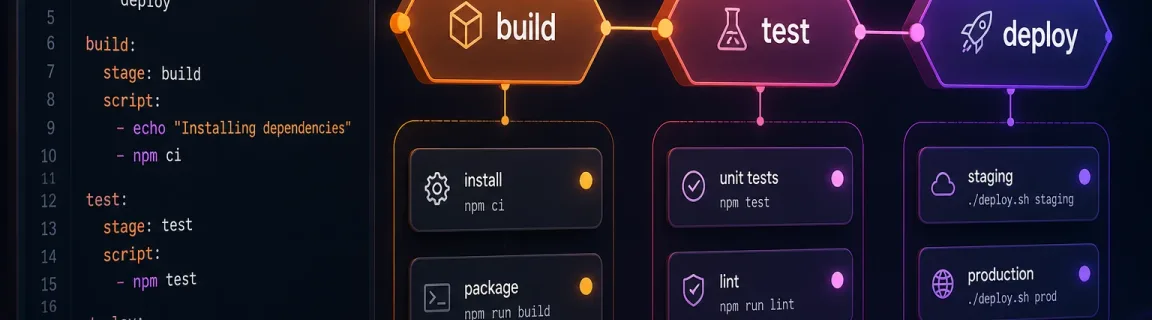
GitLab CI: Format and Validate Your .gitlab-ci.yml Online
Stages, includes, `rules:`: structurally validate a .gitlab-ci.yml before the pipeline runs — not a GitLab runner, not official CI Lint.
Why check a .gitlab-ci.yml before the pipeline runs?
A .gitlab-ci.yml that does not parse, a stages value that is not an array, or a job with neither script nor trigger, often shows up too late: red badge, Pipeline Editor, blocked merge. FastMinify does not ship GitLab’s official CI Lint and does not run a runner. The GitLab CI validator runs structural checks in the browser — root mapping, stages, jobs with script or trigger, include, hidden jobs . — and the GitLab CI formatter reindents YAML (2 or 4 spaces). The full cluster lives on the CI/CD tools hub. To minify JS/CSS in the same pipeline, see the CI/CD minification guide.
GitLab vs GitHub Actions: two YAML shapes, three layers
GitHub Actions lives under .github/workflows/*.yml (many files, on trigger, jobs with steps). GitLab CI almost always lives in a single .gitlab-ci.yml at the repo root: stages, named jobs, include. FastMinify tools follow that split — do not paste an Actions workflow into the GitLab validator.
jobs map plus required on — see the GitHub Actions guideFastMinify exposes two tools. Neither is GitLab CI Lint. Mixing the three up produces a file that looks “valid” here and still fails in Pipeline Editor.
js-yaml round-trip, 2- or 4-space indent (default 2) — see format-gitlab-ciinclude expansion, rules: evaluation — Pipeline Editor UI, API, or glab ci lintrules: clause selects the jobThe validator does not talk to a GitLab runner, does not call the CI Lint API, and does not expand remote includes. Editorial mentions of rules: are a real GitLab topic — not a browser feature.
script execution, no Docker image, no runner cacheinclude: remote / include: project expansion — only the pasted YAML is readrules:, only/except, or workflow:rulespages jobs are jobs like any other: they need script or triggerAnatomy of a .gitlab-ci.yml: what FastMinify checks
The root must be a YAML mapping, not a scalar or a list. One document: repeated --- is rejected. If stages is present, it must be an array of non-empty names. Every key that is not reserved and does not start with . is a job: it needs script (non-empty string or list) or trigger.
stages, variables, include, workflow, default, image, services, cache, before_script, after_script, spec.hidden: no script requirementextends: warning — a parent must provide script or triggerinclude: warning, not always a blockerThe formatter pretty-prints via js-yaml. It is not a semantic rewriter: key order may change, # comments disappear, indent becomes 2 or 4 spaces.
Before
After
A top-level include is enough to avoid the “no jobs” warning. FastMinify does not download included files. Past 512 KiB UTF-8, input is rejected — same as other DevOps tools on the site.
include counter: a scalar counts as 1; an array counts its lengthrules: in the pasted YAML are not interpretedglab ci lint locallyValidate, then format: a concrete workflow
Open the GitLab CI validator, paste a single .gitlab-ci.yml (max 512 KiB) and wait for debounce (~300 ms). The panel shows a verdict, issues (parse errors with a line hint), and job / stage / include counts.
The GitLab CI formatter pretty-prints via js-yaml. Paste, upload, or sample: auto-format; after a manual edit, use the Format button. This step does not prove the structure is complete.
A teammate added compile: with only stage: build. GitLab refuses the pipeline, often with a message that is hard to read in the MR overlay.
Step 1: paste the file into validate-gitlab-ci
Open validate-gitlab-ci. An invalid verdict such as “Job … needs script or trigger” points at the empty job.
Step 2: add script or trigger
Add script: [npm run build] or a real trigger:. Re-paste until the panel shows a valid structure (extends warnings may remain).
Step 3: format and open the MR
Send the fixed YAML through format-gitlab-ci, copy, commit. Reviewers read indented jobs, not a blob.
An example copied from GitLab docs or a snippet arrives with mixed spaces. You can no longer see where a job ends.
Step 1: format first if you cannot even read the file
Paste into format-gitlab-ci. This step does not prove the config is structurally complete.
Step 2: validate the indented document
Copy the output into the validator. Check stages, every job, and that . templates are not hiding a broken visible job.
Step 3: keep CI Lint for includes and rules
Once the shape is OK, schema / remote includes / rules: stay in GitLab — FastMinify does not replace that gate.
Keep GitLab CI Lint (and minify) in the chain
The browser is the fast loop: YAML plus structure. GitLab already refuses to create a pipeline if the official schema is invalid — that is why teams rarely embed a “lint CI” job in the same file. Locally, glab ci lint (official CLI, authenticated to the project) calls CI Lint: merged includes, optional --dry-run simulation. Pin your glab version; FastMinify does not replace that call. To minify JS/CSS in the pipeline, see the CI/CD minification guide.
Basic example
If the repo is on GitHub, the counterparts are format-github-actions and validate-github-actions — same idea (YAML plus structure, not actionlint). Dockerfile and Compose stay on the DevOps hub. A minified JS bundle produced by a job is read with unminify-js or the unminify guide — that is not CI YAML.
Conclusion
Paste the .gitlab-ci.yml, fix the structure (mapping, stages, jobs with script/trigger), reindent, then push. FastMinify runs that loop locally and never uploads the YAML. It is not GitLab CI Lint: remote includes, rules:, and the official schema stay in the UI, the API, or glab ci lint. For generic YAML, stay on beautify-yaml; for GitHub Actions, on the same CI/CD hub.
Validate or format a .gitlab-ci.yml now
Related Articles

Compute network, mask, host range and broadcast of a CIDR, summarize ranges into minimal blocks and check an IP, all in your browser. Nothing is uploaded.

Format a Copy as cURL, parse a raw HTTP request or response and read a HAR export in your browser: nothing is sent, nothing is replayed.

Decode a JWT header and payload, or sign a test token, right in your browser: HS256, RS256, ES256, with no secret sent to a third-party server.