Validate and Repair JSON Online: A Practical Guide
Trailing commas, single quotes, Excel exports: diagnose and fix broken JSON before it reaches production.
Why invalid JSON causes silent failures
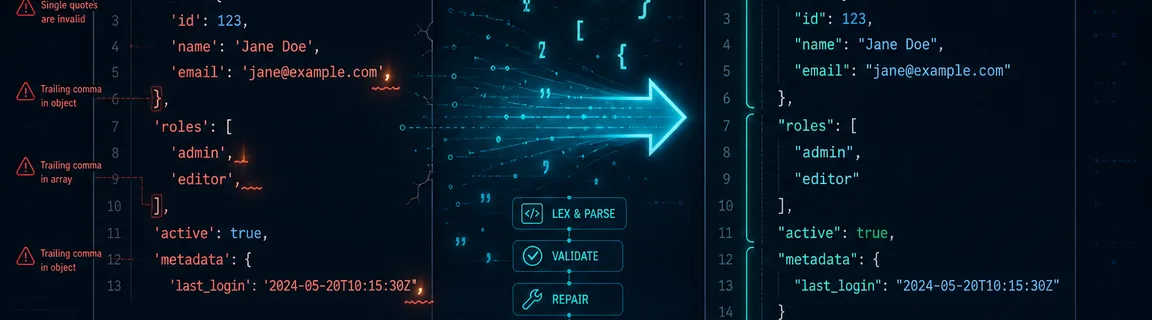
JSON is the backbone of modern APIs, configuration files and data exchange. A single trailing comma, unquoted key or wrong quotation mark can break an entire pipeline, silently in production logs or loudly in customer-facing dashboards. The online JSON validator checks syntax and reports the exact line and column of each error, so you can find the problem quickly. If validation fails and the payload is salvageable, the JSON repair tool fixes common issues: trailing commas, single quotes and missing commas between elements. Both run locally in the browser, like the rest of the online JSON tools hub. For what happens once a payload is valid and compact, see our REST API optimization guide.
Impact on your workflow and pipeline
A typical failure: the JSON fixture ships with a trailing comma and the CI test passes with a lenient local parser. The production Go server then rejects it on startup.
Before optimization
- File size
- —
- Load time
- Late, in CI or at deploy
After optimization
- File size
- —
- Load time
- Early, before the commit
Improvements
JSON repair is not magic. It handles common, well-defined patterns: trailing commas, single quotes, unquoted keys and missing commas between elements. Structural breaks go beyond automatic repair.
Improvements
Best practices and limitations
The validator is your first checkpoint: use it on any JSON you author, copy and paste from external sources, or receive from third-party APIs. Treat repair as insurance for common mistakes, not as a substitute for correct output at the source.
The json-repair tool handles well-defined patterns and is not a general-purpose AI parser. When the structure is irrecoverably broken, you need to trace the problem back to its source.
Common JSON errors and what causes them
JSON does not allow a comma after the last element in an array or object. JavaScript developers often write one (many parsers tolerate it), but strict JSON parsers in Java, Python or Go reject the file.
JSON requires double quotes (\u0022) around all strings and keys. JavaScript allows single quotes, but a payload that works in `eval()` will be rejected by any RFC 8259-compliant parser.
JavaScript objects accept bare identifiers as keys, but JSON requires every key to be a double-quoted string. This is a common mistake when hand-writing fixtures or migrating JS config files.
Real-world JSON often arrives corrupted by copy-paste artifacts: a byte order mark at the start, invisible control characters, truncated lines or HTML entities. The validator reports where parsing stops, with line and column.
Validate first, then repair with FastMinify
Work in this order: validate first, repair only if needed, minify last. The online JSON validator gives detailed error locations, and the JSON repair tool fixes what it can automatically.
1. Paste and validate
Paste your JSON into the validator, which checks it after you pause typing. A valid document gets a Valid verdict and needs nothing more. An invalid one shows the line, column and error message.
2. Repair if needed
If the error looks like trailing commas or single quotes, paste the same payload into the repair tool. It runs locally after you pause typing and shows the corrected JSON next to your input.
3. Validate again and minify
Run validation again on the repaired output to confirm that it parses cleanly. Then minify the JSON for deployment, since the compact format saves bandwidth before compression.
The two tools fit into a broader debugging workflow with other utilities on the JSON tools hub.
Conclusion
A JSON syntax error rarely announces itself politely. It fails at 2 AM in a CI run, crashes an API on startup or silently corrupts a downstream integration. Validate your payloads early with the FastMinify online validator, which points to the exact line and column. When the mistake is a common one (trailing comma, single quote), repair fixes it automatically. Re-validate, minify for production and deploy.
Validate your JSON now
Related Articles

Paste a token and a JWKS to check an RS256, ES256 or HS256 signature in your browser. How kid picks the key, measured errors and the claims to check.

HTTP/2 and HTTP/3 change how files travel, not how big they are. Measured sizes, compile times and bundling tests show what minification still saves.
Convert a Unix epoch to a readable date and back, tell seconds from milliseconds, and avoid time zone, JWT and clock change traps, all in your browser.